
Unlock Deeper Salesforce Adoption Insights with RecordWatch’s New “View Source” Data
Understanding what your users are doing in Salesforce is powerful. But understanding where they are doing it from is transformative.
That’s the thinking behind RecordWatch’s newest enhancement: View Source data.
With this new feature, every single Record View captured by RecordWatch now includes a new field: “Viewed From.” This field identifies the experience a user accessed a record from, whether it was the Salesforce Mobile App or desktop, along with the browser used.
On the surface, this is a small addition. In practice, it unlocks an entirely new layer of insight that enables Salesforce Admins, RevOps leaders, and system owners to design smarter processes, reduce friction, and significantly improve system adoption by meeting their users where they are.
Let’s break down why this matters and how you should use it.
Visibility into the Real Salesforce Experience
Salesforce looks and behaves very differently on an iPhone than it does on a 27-inch desktop monitor. The navigation, button placement, load times, layouts, and even user intent can vary dramatically.
Until now, most Admins were operating with partial information:
Page layouts were designed primarily with desktop in mind
Mobile usage was often an assumption, not a metric
Complaints such as “Salesforce is hard to use” had no context as to which experience was hard to use
With the new Viewed From field, you now gain objective, record-level clarity into exactly how users are engaging with Salesforce:
Are Sales users reviewing Opportunities on their phones or laptops?
Are Service agents primarily in Chrome, Safari, or Edge?
Which teams rely on the Salesforce mobile app the most?
Are users switching between devices during the life of a deal or case?
These are no longer subjective guesses. They’re measurable facts.
And once something is measurable, it can be improved.
Aggregation That Drives Smarter Decisions
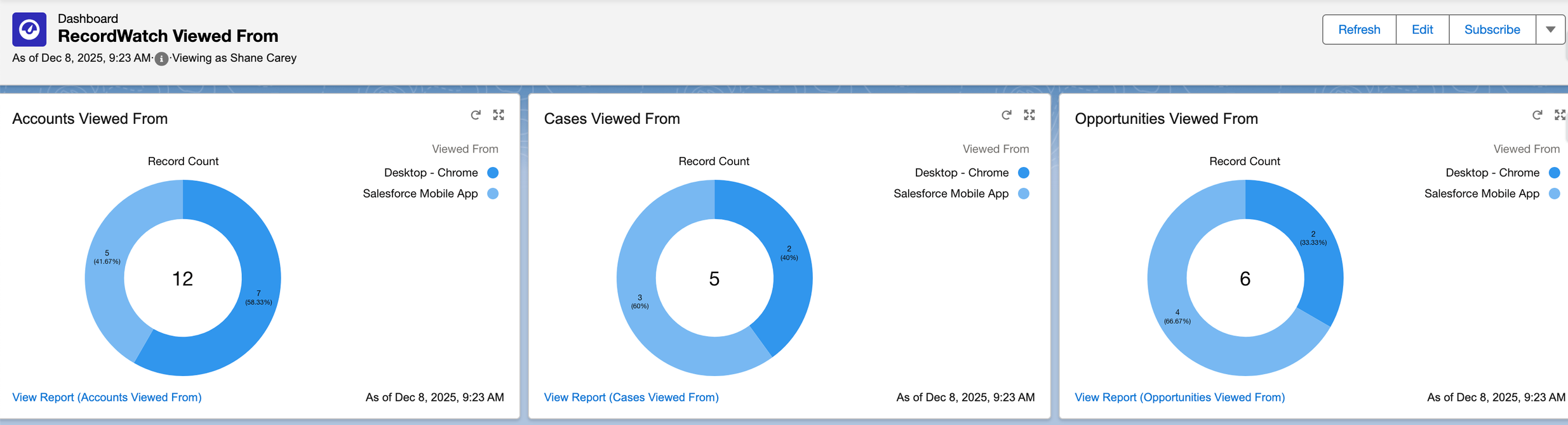
This new data point isn’t just useful at the individual record level. Because it’s part of the Record View object, it can be aggregated across nearly every dimension of your Salesforce ecosystem:
Users
Profiles
Roles
Teams
Objects
Departments
Business units
Time periods
You can now analyze questions like:
What percentage of Account record views come from mobile vs desktop?
Do regional reps rely on mobile more than inside sales?
Has mobile usage increased since our last UI change?
Are certain objects being accessed almost entirely from mobile?
These insights directly inform your roadmap and priorities:
Where should mobile optimization be focused first?
Which layouts need to be simplified for smaller screens?
Which automations or flows might be breaking the mobile experience?
Which training materials should be mobile-focused vs desktop-focused?
Instead of relying on hunches or anecdotal feedback, you can drive your development strategy using real behavioral data.
“Meet Your Users Where They Are”: Now Backed by Data
“Meet your users where they’re at” is a popular phrase in the Salesforce ecosystem. But before now, Admins had limited tools to truly understand where “where they’re at” actually was.
Is your org being used:
At desks in an office?
On tablets in the field?
On phones between meetings?
On different browsers due to corporate or security policies?
Each of these contexts creates different friction points, different needs, and different opportunities for improvement.
Knowing that 65% of Opportunities are viewed on mobile should change the way you:
Design page layouts
Order related lists
Configure quick actions
Launch flows
Write validation messages
Prioritize UI simplification
Mobile users need clarity, speed, and minimal tapping. Desktop users may benefit from denser information and richer dashboards. Without Viewing Source data, admins risk designing for a use case that represents a minority of users.
Now, you can stop guessing and start designing for reality.
A Powerful New Layer for Adoption Measurement
RecordWatch has always helped teams understand if Salesforce is being used and where users find value. View Source expands this even further by revealing how the experience itself contributes to adoption or resistance.
This unlocks powerful new use cases, such as:
Identifying whether low-adoption users are stuck on an inefficient device
Justifying investment in mobile-first design
Demonstrating ROI on mobile optimizations
Supporting business cases for device upgrades or application rollouts
Quantifying the impact of UX improvements
For Change Management, RevOps, and Leadership, this becomes compelling evidence: Your decisions are now backed by real data about real behavior in your system.
A New Standard for Intentional Admin Strategy
Salesforce administrators today are no longer just system maintainers, they are experience designers, efficiency architects, and drivers of revenue impact.
The addition of View Source data is one more step toward intentional administration where:
Assumptions are replaced with evidence
Experience is optimized, not just configured
Adoption is designed, not demanded
This new capability equips you to reduce friction, increase alignment with day-to-day workflows, and turn Salesforce into a natural, seamless part of your users’ work, not a barrier they must fight against.
Start Exploring It Today
Already a customer? Update to the latest v1.7 managed package to start capturing View Source data today! Not a customer yet? Take RecordWatch for a test drive using the “Try It” button on the AppExchange!
All that’s left is to start asking better questions of your data and designing better experiences for your users.
And as always, that’s where real Salesforce adoption begins.
